Chapter 1: Idiomatic Python

Chapter 1: Idiomatic Python

Rule
Untested code is wrong code.

Printing all values in the same line

for i in range(1,15,1): # range(begin,end, step)
   print(i**0.01, end=" ")
1.0 1.0069555500567189 1.0110466919378536 1.013959479790029 1.0162245912673256 1.0180790778133073 1.0196496638564592 1.0210121257071934 1.022215413278477 1.023292992280754 1.0242687596005495 1.0251603778007359 1.025981272414434 1.0267418881337291 
  • The command end=" " prints the whole output in a single line. We can also use end="\t" or end="\n"
  • The range function only works with integer step size!

Data Structures

Lists

Lists are a container of elements. They are mutable.

  • Caution Renaming a list and changing it will also change the original list.
xs = [1,2,3]
ys = xs
ys.append(10)
print(xs)
[1, 2, 3, 10]

Example: Creating lists

import math
xs=[]
for i in range(20):  
   xs.append(math.sin(i*math.pi/10))  
print(f"xs={xs}")
xs=[0.0, 0.3090169943749474, 0.5877852522924731, 0.8090169943749475, 0.9510565162951535, 1.0, 0.9510565162951536, 0.8090169943749475, 0.5877852522924732, 0.3090169943749475, 1.2246467991473532e-16, -0.3090169943749469, -0.587785252292473, -0.8090169943749473, -0.9510565162951535, -1.0, -0.9510565162951536, -0.8090169943749476, -0.5877852522924734, -0.3090169943749476]

Example: Mutating Lists

Lists are mutable.

xs = [1,2,3]
xs[0]=100
print("xs[0]=100")
print(f"xs={xs}")
xs[0]=100
xs=[100, 2, 3]

To reverse a list we need to do some stuffs.

Example: Reversing a list

import math

# GENERATING A LIST
xs=[]  
for i in range(20):  
   xs.append(math.sin(i*math.pi/10))  
print(f"xs={xs}")

# REVERSING THE GENERATED LIST
for i in range(20):
   temp = xs[::-1] # [start:stop:step]
xs = temp
print(f"Reversed xs={xs}")
xs=[0.0, 0.3090169943749474, 0.5877852522924731, 0.8090169943749475, 0.9510565162951535, 1.0, 0.9510565162951536, 0.8090169943749475, 0.5877852522924732, 0.3090169943749475, 1.2246467991473532e-16, -0.3090169943749469, -0.587785252292473, -0.8090169943749473, -0.9510565162951535, -1.0, -0.9510565162951536, -0.8090169943749476, -0.5877852522924734, -0.3090169943749476]
Reversed xs=[-0.3090169943749476, -0.5877852522924734, -0.8090169943749476, -0.9510565162951536, -1.0, -0.9510565162951535, -0.8090169943749473, -0.587785252292473, -0.3090169943749469, 1.2246467991473532e-16, 0.3090169943749475, 0.5877852522924732, 0.8090169943749475, 0.9510565162951536, 1.0, 0.9510565162951535, 0.8090169943749475, 0.5877852522924731, 0.3090169943749474, 0.0]

We can also add lists using the + operator

xs = 10*[0]  
ys = 10*[math.pi]  
zs = xs + ys  
print(zs)
[0, 0, 0, 0, 0, 0, 0, 0, 0, 0, 3.141592653589793, 3.141592653589793, 3.141592653589793, 3.141592653589793, 3.141592653589793, 3.141592653589793, 3.141592653589793, 3.141592653589793, 3.141592653589793, 3.141592653589793]

To get the length and sum of the list we use the len and sum function respectively

xs = [1,2,3]
print(len(xs))
sum((xs))
3
6

List slicing

To get a new list from a old one you have to slice it. Caution: When you slice you get a copy of the original list That is, when you name a list something else then mutate it it will mutate the original list. But if you slice it then you get a copy of the original list.

  • To slice a whole copy of the list such that changing the copy will not change the original,
xs = [1,2,4]
ys = xs[:]
print(ys)
[1, 2, 4]
  • Use the colon operator : will get the entire list
print("Upto but not including 5")  
xs[2:5]
Upto but not including 5
[4]

Manipulating the steps in the list.

## Slicing with steps  
xs[::2]
[1, 4]

List slicing syntax

a = [1,3,4]
a[begin:end:step]
  • a[1:3] will give elements [1,3).

Note: The range() function works similarly to lists but uses commas , instead of colons :.

range(begin,end,step)

Tuples

Tuples can be thought of as immutable lists. tuple1 = (a,b,c) - They can be called like the array e.g., tuple1[0] will output a. - We can omit the parentheses for tuples

tuple1 = 1,2,3
print(tuple1)
(1, 2, 3)
x = 1; y =2; z = 3
x,y,z
(1, 2, 3)

Tuples can be used to return multiple values from a function

def foo(a, b):  
   z = a + b  
   return a,b,z  
foo(1,2)
(1, 2, 3)

Strings

Strings can also be viewed as immutable lists. They are sequences of characters, e.g., name='Marry' - We can concatenate two strings using the + operator.

Example: Reversing a string

name = "Marry"

## Reversing strings
temp = ''
length = len(name)
for i in range(len(name)):
   if i==0:
       i = -1
   else:
       i = -i-1
   temp = temp+(name[i])
print(name)
print(temp)
Marry
yrraM

The format() function

The format() function converts other data types to strings.

  • Syntax
x = 1
y = 2
"{0} {1}".format(x,y)
'1 2'

Example: Formatting Booleans to strings

A = True; B = False
"{0} {1}".format(A,B)
'True False'

Example: Converting a list of numbers to string using the format function

# Generate a list
import random as rd  
xs = []  
rd.seed(100)  
for i in range(20):  
   xs.append(rd.randint(0, 100))  
print(f"Generated list: {xs}")

# Converting a list to string
ys = ""
for i in range(len(xs)):
   if i== len(xs)-1:
       ys += str({i})
   else:
       ys += str({i})+', '
# print(ys)


ys = ys.format(xs[0],xs[1],xs[2],xs[3],xs[4],xs[5],xs[6],xs[7],xs[8],xs[9],xs[10],xs[11],xs[12],xs[13],xs[14],xs[15],xs[16],xs[17],xs[18],xs[19])

print(ys)
Generated list: [18, 58, 58, 98, 22, 90, 50, 93, 44, 55, 64, 14, 68, 15, 10, 94, 58, 33, 6, 84]
18, 58, 58, 98, 22, 90, 50, 93, 44, 55, 64, 14, 68, 15, 10, 94, 58, 33, 6, 84

A better way to format a list of numbers to strings.

Example: Converting a list of numbers to string using the format function 2

# Generating a list of numbers
import random as rd  
xs = []  
rd.seed(100)  
for i in range(20):  
   xs.append(rd.randint(0, 100))  
print("Generated list: ", xs)

# Converting the list of numbers to strings
ys = ""
for i in range(len(xs)):
   if i == len(xs)-1:
       ys += str(xs[i])
   else:
       ys += str(xs[i])+',' 
print(ys)
Generated list:  [18, 58, 58, 98, 22, 90, 50, 93, 44, 55, 64, 14, 68, 15, 10, 94, 58, 33, 6, 84]
18,58,58,98,22,90,50,93,44,55,64,14,68,15,10,94,58,33,6,84

We can control the precision of the decimals using the format() function as well.

x = 3.1; y = 4
"{0:1.15}{1}".format(x,y)
'3.14'

Example: Precision controlling \(\pi\) to 15 digits

import math
π = math.pi
"π approximation to 15 digits: {0:1.15f}".format(π)
'π approximation to 15 digits: 3.141592653589793'

This will output the value of x with precision of 15 decimal places. - Note: We use the colon operator : to specify the number of decimal places.

f strings

The syntax for f strings,

a = 1; b = 2
print("a = {a}, b = {b}")
a = {a}, b = {b}

Dictionaries

A dictionary is an associative array containing key value pairs.

myDic = {
   'a': 1,
   'b': 2,
   'c': 3
}
myDic['c']
3

Another way to create dict is through the following syntax

better_dic: dict = {'a':1,'b':2, 'c':3 }
print(better_dic)
{'a': 1, 'b': 2, 'c': 3}

This is more powerful because we can make multi valued dictionaries with it.

com_dic: dict = {0:['a','b'], 1:['c', 'd']}
print(com_dic)
{0: ['a', 'b'], 1: ['c', 'd']}

This is another way of declaring stuffs like dict list etc.

There are 11 methods that can be used in python dictionaries.

Method 1: values()

This outputs all the values of a key value paired dictionary.

myDic = {
   'a': 1,
   'b': 2,
   'c': 3
}

print(myDic.values())
dict_values([1, 2, 3])

Method 2: items()

This prints the whole dictionary with all its key value pairs

dic = {'a':1, 'b':2, 'c':3}
print(dic.items())
dict_items([('a', 1), ('b', 2), ('c', 3)])

Method 3: keys()

keys() does the exact opposite of the values() method.

dic = {'a':1, 'b':2, 'c':3}
print(dic.keys())
dict_keys(['a', 'b', 'c'])

Method 3: pop()

pop() allows us to remove a specific entry by referencing its key.

dic = {'a':1, 'b':2, 'c':3}
dic.pop('a')
print(dic)
{'b': 2, 'c': 3}
dic = {'a':1, 'b':2, 'c':3}
print(dic.pop('a'))
1

Method 4: popitem()

popitem() removes the last item from our dictionary

dic = {'a':1, 'b':2, 'c':3}
dic.popitem()
print(dic)
{'a': 1, 'b': 2}

Method 5: copy()

Through copy() method we can create a copy of an existing dictionary

another_dic: dict = {0:['a','b'], 1:['c','d']}
my_copy = another_dic.copy()
print(my_copy)
{0: ['a', 'b'], 1: ['c', 'd']}

We can use the id method to check the memory address of the lists to see they are indeed different.

print(id(another_dic),id(my_copy))
140103665130368 140103665190848

Warning: Python uses shallow copy like lists, changing the copy will change the source. #### Method 6: get() The get() function is used to get a particular value as output.

myDic = {
   'a': 1,
   'b': 2,
   'c': 3
}
print(myDic.get('a'))
1

If the key is out of range we will get a None output as default. We can change it to a specific error message if we like.

myDic = {
   'a': 1,
   'b': 2,
   'c': 3
}
print(myDic.get('z','Missing!'))
Missing!

Method 7: setdefault()

Similar to the get() method, it tries to grab a key value pair, but if that key value pair doesn’t exist setdefault() will create it.

myDic = {
   'a': 1,
   'b': 2,
   'c': 3
}
print(myDic.setdefault('z', 100))
print(myDic)
100
{'a': 1, 'b': 2, 'c': 3, 'z': 100}

Method 8: clear()

This clears the dictionary making it empty

myDic = {
   'a': 1,
   'b': 2,
   'c': 3
}
print(myDic.setdefault('z', 100))
print(myDic.clear())
100
None

Method 9: fromkeys()

Transforms a list to a dictionary

Example: Dictionary from list with None as the placeholder for keys

people: list[str] = ["John", "Jane", "Joe"]
users: dict = dict.fromkeys(people)
print(users)
{'John': None, 'Jane': None, 'Joe': None}

Example: Dictionary from list with a string as the placeholder for key

people: list[str] = ["John", "Jane", "Joe"]

users: dict = dict.fromkeys(people,'Unknown')
print(users)
{'John': 'Unknown', 'Jane': 'Unknown', 'Joe': 'Unknown'}

Method 10: items()

To get the keys and values of a dictionary.

users: dict ={0: "Mike", 1: "Bob", 2: "Alice"}
for k,v in users.items():
   print(k,v)
0 Mike
1 Bob
2 Alice

Method 11: update()

Using update() we can expand our dictionary.

users: dict ={0: "Mike", 1: "Bob", 2: "Alice"}

users.update({3: "John"})
print(users)
{0: 'Mike', 1: 'Bob', 2: 'Alice', 3: 'John'}
output: {0: 'Mike', 1: 'Bob', 2: 'Alice', 3: 'John'}

If you input a key value pair that already exists it will update to the most recent key value pair and the older one will be removed.

Example: Clashing keys
users: dict ={0: "Mike", 1: "Bob", 2: "Alice"}

users.update({1: "John"})
print(users)
{0: 'Mike', 1: 'John', 2: 'Alice'}
output: {0: 'Mike', 1: 'John', 2: 'Alice'}

We can also update our dictionary using a pipeline |.

users: dict ={0: "Mike", 1: "Bob", 2: "Alice"}

users.update({1: "John"})
print(users | {4: "Scar", 5: "Tom"})
{0: 'Mike', 1: 'John', 2: 'Alice', 4: 'Scar', 5: 'Tom'}
output: {0: 'Mike', 1: 'John', 2: 'Alice', 4: 'Scar', 5: 'Tom'}

We can also do in place assignment using |= to assign values to our dictionary. This is the newer version of update()

users: dict ={0: "Mike", 1: "Bob", 2: "Alice"}
users |= {'name': 'John', 'age': 30, 'city': 'New York'}
print(users)
{0: 'Mike', 1: 'Bob', 2: 'Alice', 'name': 'John', 'age': 30, 'city': 'New York'}
output: {0: 'Mike',
         1: 'Bob',
         2: 'Alice',
         'name': 'John',
         'age': 30,
         'city': 'New York'}

Python enumerate function

The enumerate() function is used to create pairing.

Example:

import numpy as np
t = np.linspace(0, 10, 10)
y = np.sin(t)

for t, y in enumerate(y):
   print(t, y)
0 0.0
1 0.8961922010299563
2 0.7952200570230491
3 -0.19056796287548539
4 -0.9643171169287782
5 -0.6651015149788224
6 0.37415123057121996
7 0.9970978909438749
8 0.510605678474283
9 -0.5440211108893698

Example:

names: list[str]= ["John", "Scar", "Michael","Jessica","Mary","David","Sarah","Emily","Daniel","Olivia"]

profile: dict[str,str] = {}
for i,names in enumerate(names):
   profile |= {names:i}
print(profile)
{'John': 0, 'Scar': 1, 'Michael': 2, 'Jessica': 3, 'Mary': 4, 'David': 5, 'Sarah': 6, 'Emily': 7, 'Daniel': 8, 'Olivia': 9}
output: {'John': 0, 'Scar': 1, 'Michael': 2, 'Jessica': 3, 'Mary': 4, 'David': 5, 'Sarah': 6, 'Emily': 7, 'Daniel': 8, 'Olivia': 9}

The reversed() function

xs = [1,2,3]
for i in reversed(xs):
   print(i)
3
2
1

User defined functions

Anonymous functions lambda

In python we can create throw-away functions using the lambda.

f = lambda x: x + 4

These are helpful for creating one time functions.

Example:

Suppose we wish to put the linear combination of fa(x) and fb(x) but we do not know the parameters a and b for the expression a*fa(x)+b*fb(x) and the der() function only accepts functions. Without modifying the function or creating a new function we can use the lambda function to get the job done.

# Problem: 1.4

## Defining a function that is creates a linear combination of two other functions

def fa(x):
   return x+1

def fb(x):
   return x+7

def fc(x,a,b):
   return a*fa(x) + b*fb(x)

def der(f,x,h=0.01):
   return (f(x+h)-f(x))/h

print(der(lambda x:fc(x,1,1),1))
1.9999999999999574

Core-Python Idioms

We now want to use a syntax that makes the code more concise and straightforward.

List comprehensions

For one list:

[i**2 for i in range(30)]

For two lists use the zip() function

Example: Iterating through two lists

xs = np.random.random(100)
ys = np.random.random(100)

[x*y for x,y in zip(xs,ys)]
[0.18219827008714864,
 0.7481491802575803,
 0.22290229423424848,
 0.17046943920542806,
 0.494938813541671,
 0.39211185990701375,
 0.11098659150486885,
 0.6187634856729576,
 0.7373422487936492,
 0.009612861424962376,
 0.25844789732889156,
 0.17238479472504203,
 0.001572691780614067,
 0.18356525541883628,
 0.15809173888038922,
 0.3788773933325553,
 0.03169090423118541,
 0.32523136841508427,
 0.9517328610480859,
 0.5005772858986157,
 0.3280504335872162,
 0.00674803991851377,
 0.015605736816390067,
 0.05244392455238989,
 0.09257225596250036,
 0.5003306967416153,
 0.5133883760233291,
 0.1280286610450579,
 0.07426735979549648,
 0.2098134489563944,
 0.11368921369463522,
 0.06109693651768494,
 0.10728516997932482,
 0.3105650955605598,
 0.1660253704882784,
 0.08335007614814877,
 0.17609348939556482,
 0.031316430348806525,
 0.17388853565002765,
 0.18042605609757936,
 0.36471641857535414,
 0.03365255292567646,
 0.12525452786818178,
 0.07622152833576921,
 0.21903233107522552,
 0.5249844548961476,
 0.034212454358207765,
 0.30224144849688916,
 0.5830063509354293,
 0.509599507979244,
 0.5261002668974939,
 0.23597365808464313,
 0.22707359140282102,
 0.31285965730741117,
 0.03043362195474699,
 0.010459082357887133,
 0.539789286084372,
 0.08838540676674124,
 0.6996425940001086,
 0.048373748785535645,
 0.11194309161031614,
 0.40528691959915464,
 0.5853329590862385,
 0.028986236561587334,
 0.10002595149974144,
 0.16142449586434657,
 0.5376026461074219,
 0.5392736701351482,
 0.5232622011770306,
 0.16149024385344346,
 0.49007795505115404,
 0.24201999463076793,
 0.3943429187513581,
 0.018782025459347998,
 0.15228435767602594,
 0.8956643775416108,
 0.19172156116359512,
 0.01691572839222918,
 0.03584752424499268,
 0.12727587971953244,
 0.18688408752410834,
 0.18921886197666835,
 0.20980928408672933,
 0.11586690252673561,
 0.022759557570475392,
 0.00588228062157452,
 0.03816834340433043,
 0.06991151181340476,
 0.537820784354661,
 0.23971298260023433,
 0.19119580355923577,
 0.0863346375085274,
 0.3585491504573777,
 0.015885972524031726,
 0.38807069779536835,
 0.4219789736983442,
 0.10319590635280007,
 0.18539876076907832,
 0.30920580181047774,
 0.5947328533326081]
Example: Three lists

a = [1,2,3,4,5]
b = ['a','b','c','d']
c = ['Scar', 'John']

list(zip(a,b,c))
[(1, 'a', 'Scar'), (2, 'b', 'John')]
output: [(1, 'a', 'Scar'), (2, 'b', 'John')]

Example: zip function creates an ordered pair only

xs = [1,2,3,4,5]
ys = [4,3,6,0,9]

for i,j in zip(xs,ys):
   if i==j:
       print(True)
   else:
       print(False)
False
False
False
False
False
output: False
         False
         False
         False
         False
  • To see why consider,
xs = [1,2,3,4,5]
ys = [4,3,6,0,9]

list(zip(xs,ys))
[(1, 4), (2, 3), (3, 6), (4, 0), (5, 9)]
output: [(1, 4), (2, 3), (3, 6), (4, 0), (5, 9)]
  • There is no pair (i,j) where i==j.

Idiomatically working with Dictionaries

Use the items() method.

Example:

names: dict[int,str] = {1:'Sarah', 2:'John', 3:'James', 4:'Mary'}

names_list = [(key,value) for key, value in names.items()]
names_tuple =  tuple((key,value) for key, value in names.items())

print("names_list: ", names_list)
print("names_tuple: ", names_tuple)
names_list:  [(1, 'Sarah'), (2, 'John'), (3, 'James'), (4, 'Mary')]
names_tuple:  ((1, 'Sarah'), (2, 'John'), (3, 'James'), (4, 'Mary'))

Exception Handling

1. assert

Example: Using the assert keyword
x = int(input("Enter a number: "))
y = int(input("Enter another number: "))

assert y != 0, "Cannot divide by zero"

print(x/y)

It can also be used in if-else control flows.

2. break

When you want to exit out of a loop prematurely, you use the break keyword.

Example
x = [i for i in range(5)]
y = [i+i for i in range(5,0,-1)]

for i in range(len(x)):
   for j in range(len(y)):
       if x[j] == 0:
           print("Cannot divide by zero")
       elif x[i]==x[j]:
           print(f"{x[i]} is equal to {x[j]}")
           break
       elif x[i]==x[j]:
           print(x[i]/0) # Division by zero
Cannot divide by zero
1 is equal to 1
Cannot divide by zero
2 is equal to 2
Cannot divide by zero
3 is equal to 3
Cannot divide by zero
4 is equal to 4
output: Cannot divide by zero
        Cannot divide by zero
        1 is equal to 1
        Cannot divide by zero
        2 is equal to 2
        Cannot divide by zero
        3 is equal to 3
        Cannot divide by zero
        4 is equal to 4
  • We divided by zero after the break yet it doesn’t get there because the break keyword breaks the loop.

Basic Plotting with matplotlib

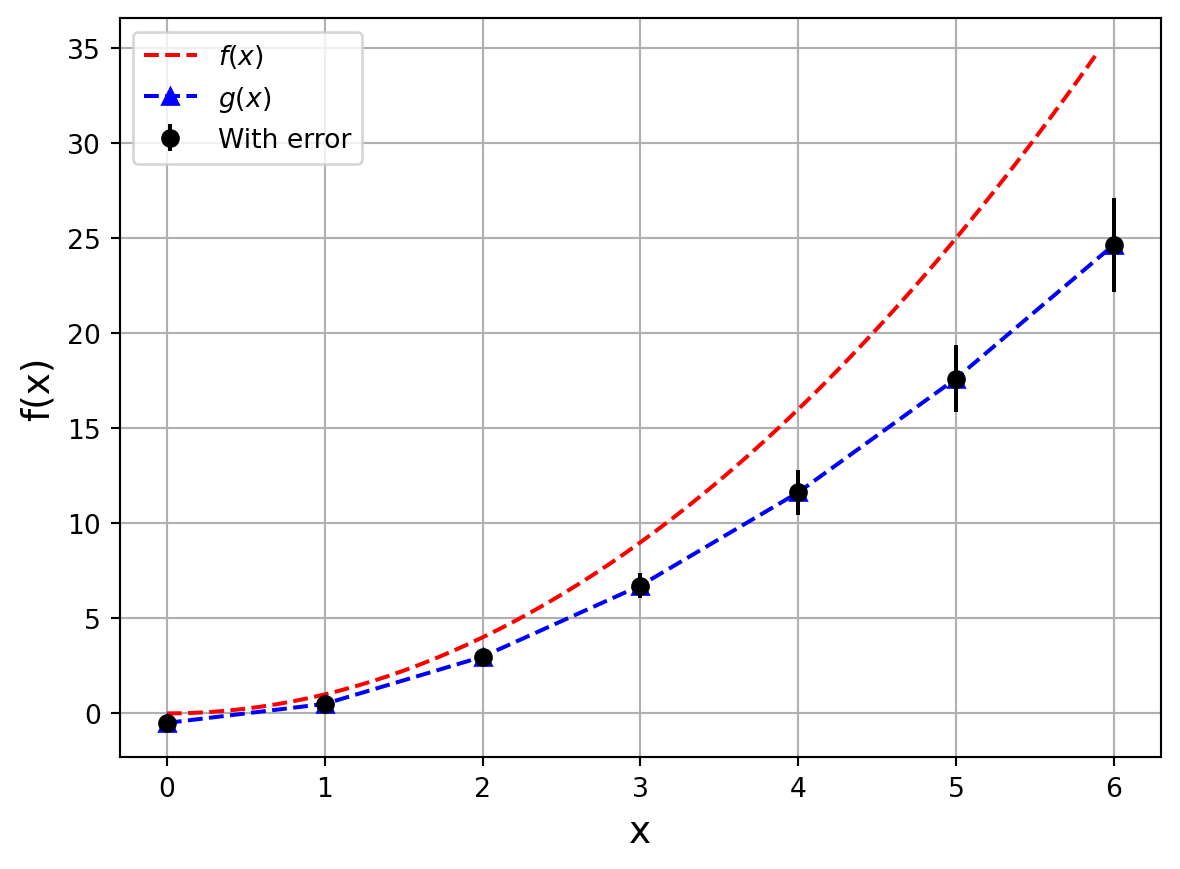
Example:

import matplotlib.pyplot as plt
import numpy as np

def Plot(xs, ys, dxs, dys):
   plt.xlabel("x", fontsize=14)
   plt.ylabel("f(x)", fontsize=14)
   plt.plot(xs, ys, 'r--', label="$f(x)$")
   plt.plot(dxs, dys, 'b--^', label="$g(x)$")
   plt.errorbar(dxs, dys, dyerrs, fmt='ko', label="With error")
   plt.legend()
   plt.grid(True)
   plt.show()

xs = [0.1*i for i in range(60)]
ys = [x**2 for x in xs]
dxs = [i for i in range(7)]
dys = [x**1.8 -0.5 for x in dxs]
dyerrs = [0.1*np.abs(y) for y in dys]

Plot(xs, ys, dxs, dys)

Arguments of the plot() function

plt.plot(x_values, y_values, 'plotStyle', label='Function')
  • In the third call to plot() is a format string that specifies the style of the plot.
Example:
Character Color
‘b’ blue
‘g’ green
‘r’ red
‘c’ cyan
‘m’ megenta
‘y’ yellow
‘k’ black
‘w’ white
Character Description
‘-’ solid line style
‘–’ dashed line style
‘-.’ dash-dot line style
‘:’ dotted line style
‘o’ circle marker
‘s’ square markerq
‘D’ diamond marker
‘^’ triangle up marker

The forth argument is also a format string that specifies the label of the function plotted. We can use the plt.legend() after this to get legends.

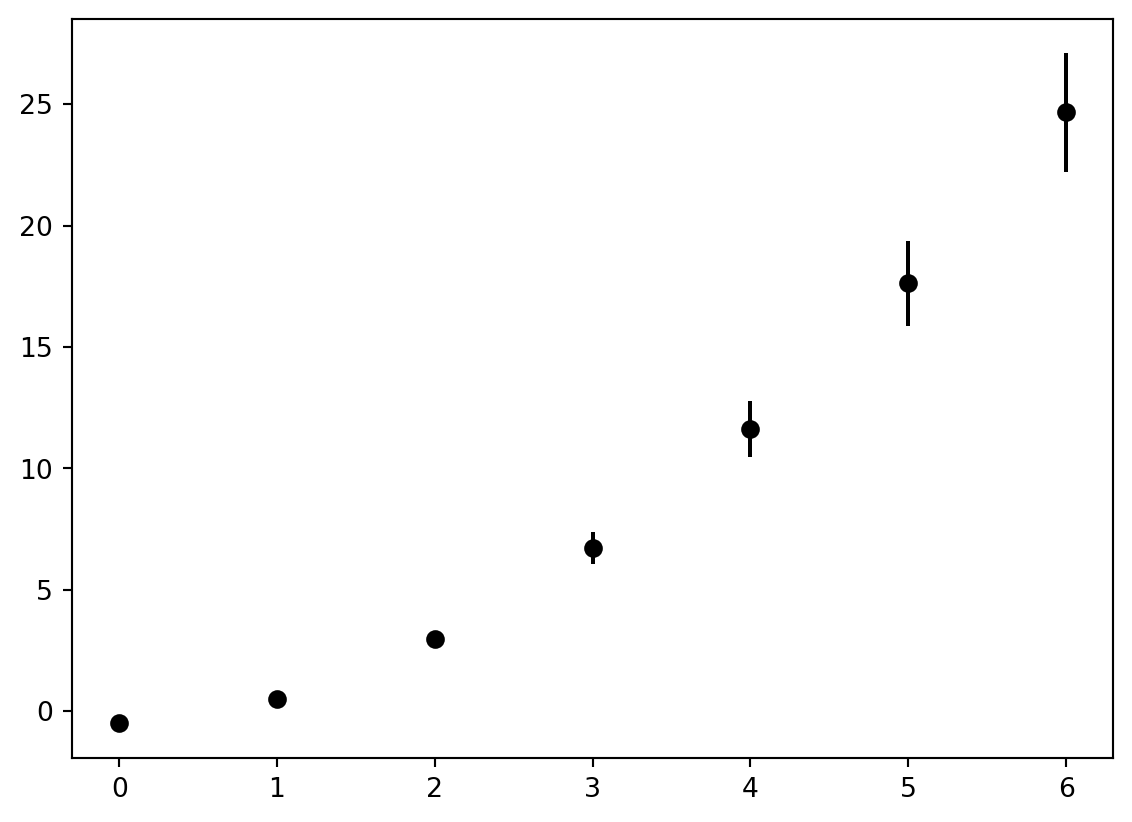
Error bars

plt.errorbar(dxs, dys, dyerrs, fmt='ko', label="With error")

where dyerrs is specified outside the function in that example.

dyerrs = [0.1*np.abs(y) for y in dys]

Latex-like equations in plots

plt.plot(x,y,label="$x_i$")

Specifying which values are displayed

  • We can specify which values are displayed via xlim() and ylim().
  • We could also employ a log-scale for one or both axes using xscale() or yscale().

Numpy idioms

We can use the built in zip function to step through lists in parallel.

def f(x):
   return x**2 - 2

ws = [1,2,3,4,5,6,7,8,9,10]
xs = [0.1,0.2,0.3,0.4,0.5,0.6,0.7,0.8,0.9,1.0]

c = [w*f(x) for w,x in zip(ws,xs)]
print(c)
[-1.99, -3.92, -5.7299999999999995, -7.359999999999999, -8.75, -9.84, -10.57, -10.879999999999999, -10.709999999999999, -10.0]

Almost always python lists are of homogeneous type. So we can do the tasks more efficiently using a fixed-length homogeneous container.

This is where numpy comes in.

Numpy also allows us, for the most part, to avoid writing loops.

Numpy arrays are row major similar to C programming language.

One-dimensional arrays

One-dimensional arrays are direct replacements for lists. We can make an one-dimensional array using the array function in numpy.

some_list = [1,2,3,4,5,6]
A  = np.array(some_list)

or,

ys = np.array([1,2,3,4,5,6])

The array() function creates an array object.

  • If you want to see how many elements are in the array ys, use the size attribute.
ys.size
6
  • To check the data type of an array in numpy use the dtype attribute
ys.dtype
dtype('int64')
  • We can also specify the data type when creating a numpy array
ys = np.array([1,2,3,4,5], dtype=np.float32)
  • To get the dimensions of an array like you would get for matrix in linear algebra use the shape attribute

Common numpy attributes

Attribute Description
dtype Data type of array elements
ndim Number of columns in the array
shape Tuple with number of elements for each dimension
size Total number of elements

To create containers with predefined size we can use np.zeros() or np.ones(), e.g., np.zeros(5), np.zeros((5,5)).

We can work with float arguments using np.arange() unlike the built-in range() function. However, it is better to use the np.linspace() function.

# syntax for linspace
np.linspace(min_, max_,steps)

There is also the np.logspace() function that creates logarithmically spaced grid points.

np.logspace(1, 10, 10)
array([1.e+01, 1.e+02, 1.e+03, 1.e+04, 1.e+05, 1.e+06, 1.e+07, 1.e+08,
       1.e+09, 1.e+10])
output: array([1.e+01, 1.e+02, 1.e+03, 1.e+04, 1.e+05, 1.e+06, 1.e+07, 1.e+08,
   1.e+09, 1.e+10])

Copying in numpy

Python arrays as well as numpy arrays use shallow-copy

To do a deep-copy use np.copy() function.

A = np.random.random(10)
B = np.copy(A[::-1])
B[0] = 10
print(A)
print('------')
print(B)
[0.08556686 0.22493041 0.86344954 0.85277965 0.14672531 0.18112413
 0.61282846 0.49061149 0.10468168 0.35911734]
------
[10.          0.10468168  0.49061149  0.61282846  0.18112413  0.14672531
  0.85277965  0.86344954  0.22493041  0.08556686]

Broadcasting

Arrays, unlike lists, can be used to broadcast numbers onto many slots.

List slicing in numpy cannot be used to copy arrays but it can be used to broadcast a slice or an element of the array to itself. This syntax is known as an everything slice.

A = np.random.random(10)
A*A[::-1]
print(A)
[0.84189382 0.37241982 0.49934852 0.16177673 0.52219324 0.85268748
 0.95345486 0.97095883 0.79059264 0.16159951]

By default, numpy broadcasts all its arrays. This ability to carry out batch operations on all elements of an array is called vectorization.

Example: The dot product
A = np.random.random(10)
B = np.random.random(10)

np.sum(A*B) # Vectorization
2.3167849137929664

You can also carry out other operations with arrays that wouldn’t be possible with matrices or vectors like 1/np.array([1,2,3]) thanks to broadcasting.

Other useful functions

  • np.where() helps you to find specific indices where a coordination is met, e.g., np.where(2==xs)

  • np.sum() sums all the elements of any N-dimensional array.

  • np.argmax() and np.argmin() returns the maximum and minimum value of an array respectively.

  • np.transpose() transposes the array A. We can also use the shorthand A.T to get the same result.

    import numpy as np 
    
    np.random.seed(12)
    
    A = np.random.random((3,3))
    
    print(A.T)
    [[0.15416284 0.53373939 0.90071485]
     [0.7400497  0.01457496 0.03342143]
     [0.26331502 0.91874701 0.95694934]]
  • The reshape() function in numpy reshapes the array to the specified dimension.

xs = np.array(([1,2],
              [3,4],
              [5,6]))
print(xs.reshape(6,1))
[[1]
 [2]
 [3]
 [4]
 [5]
 [6]]
Useful functions for 2 or more dimensional arrays
  • np.diag() outputs the diagonal matrix
  • np.tril() and np.triu() to get lower triangle and upper triangle of an array respectively.

One of the most important function is the np.meshgrid() function which takes two vectors and returns a coordinate matrix.

  • np.fill_diagonal() is helpful to update an array that you already created.
  • np.trace() is used to find the trace of a matrix.

Multiplying matrices

We can multiply matrices using the @ infix operator.

Example: Matrix multiplication
import numpy as np
np.random.seed(12)

A = np.random.random((3,3))
B = np.random.random((3,1))

print(A@B)
[[0.39079047]
 [0.63420792]
 [0.71306332]]

Looping in Numpy

We can loop over rows and columns in numpy

import numpy as np
np.random.seed(12)

A = np.random.random((3,3))
B = np.random.random((3,1))

# Loop over the rows
print("Looping over the rows")
for row in A:
    print(row)

# Looping over columns
print("Looping over columns")
for columns in B.T:
    print(columns)
Looping over the rows
[0.15416284 0.7400497  0.26331502]
[0.53373939 0.01457496 0.91874701]
[0.90071485 0.03342143 0.95694934]
Looping over columns
[0.13720932 0.28382835 0.60608318]

Inner and outer product

For inner and outer product we use np.inner() and np.outer() function respectively.

Example: Inner and outer product demo
import numpy as np
np.random.seed(12)

A = np.random.random((2,2))
B = np.random.random((2,2))

print(f"Matrix A is: \n {A}")
print('----------------------------------------')
print(f"Matrix B is: \n {B}")
print('----------------------------------------')

innerProduct = np.inner(A,B)
print(f"Inner product of A and B is:\n {innerProduct}")
print('----------------------------------------')

outerProduct = np.outer(A,B)
print(f"Outer product of A and B is: \n {outerProduct}")
Matrix A is: 
 [[0.15416284 0.7400497 ]
 [0.26331502 0.53373939]]
----------------------------------------
Matrix B is: 
 [[0.01457496 0.91874701]
 [0.90071485 0.03342143]]
----------------------------------------
Inner product of A and B is:
 [[0.68216536 0.16359028]
 [0.49420928 0.25501008]]
----------------------------------------
Outer product of A and B is: 
 [[0.00224692 0.14163665 0.13885676 0.00515234]
 [0.0107862  0.67991844 0.66657375 0.02473352]
 [0.00383781 0.24191988 0.23717175 0.00880036]
 [0.00777923 0.49037147 0.480747   0.01783833]]
Example: Outer product of \(n\times 1\) and an \(1\times n\) matrix
import numpy as np
np.random.seed(10)

A = np.random.random((3,1))
B = np.random.random((1,3))

C = np.outer(A,B)

print(C)
[[0.57756789 0.38450875 0.17339029]
 [0.01553914 0.01034499 0.00466497]
 [0.47447826 0.31587809 0.142442  ]]

Usually the np.dot() function and @ infix operator does the job of inner and outer product respectively.

Specifying axis

We can specify whether we want a row-wise or column-wise operation by specifying an additional attribute axis to all the functions above.

  • Setting axis=0, you operate across rows (column-wise).
  • Setting axis=1 you operate across columns (row-wise)

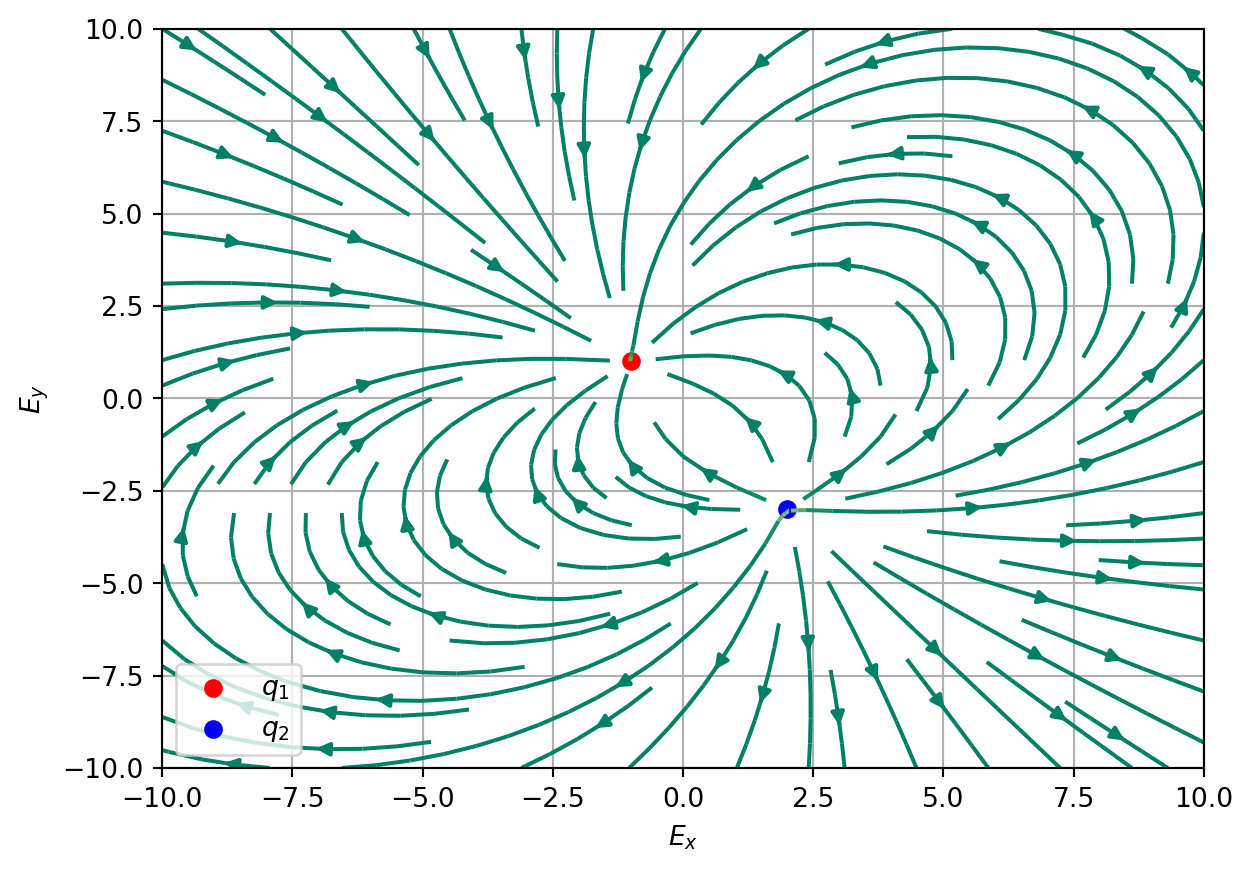
Project: Visualizing Electric Field

import numpy as np
import matplotlib.pyplot as plt

# k value
k = 8.99e9

# For arbitrary r0
x0,y0 = 0,0

# Charge values
q1 = -5e-6
q2 = 6e-6

# Charge position
x1,y1 = -1,1
x2,y2 = 2,-3

# Grid
X,Y = np.meshgrid(np.linspace(-10,10,100),np.linspace(-10,10,100))

def electric_field(q, qx, qy, X,Y):
    Rx = X - (qx - x0)
    Ry = Y - (qy-y0)
    R = np.sqrt(Rx**2 + Ry**2)
    Ex = k * Rx * q / R**3
    Ey = k * Ry * q / R**3
    return Ex, Ey

Ex1, Ey1 = electric_field(q1,x1,y1,X,Y)
Ex2, Ey2 = electric_field(q2,x2,y2,X,Y)

Ex = Ex1 + Ex2; Ey = Ey1+Ey2

plt.streamplot(X,Y,Ex,Ey, color=np.sqrt(Ex**2+Ey**2), cmap='summer', density=1)
plt.scatter(x1 - x0, y1-y0,color='red',label=r'$q_{1}$')
plt.scatter(x2 - x0,y2-y0,color='blue',label=r'$q_{2}$')
plt.legend()
plt.xlabel(r'$E_{x}$')
plt.ylabel(r'$E_{y}$')
plt.grid()
plt.show()